sábado, 13 de agosto de 2011

Wait Stats in SQL Server

When you are optimizing a SQL Server installation you must look at the Wait Stats in SQL Server and the easier way to check them is using the following DMVs  sys.dm_os_waiting_tasks, sys.dm_exec_requests and sys.dm_os_wait_stats.

The sys.dm_os_wait_stats contains aggregated information about wait statistics for SQL Server, you must be aware that these wait statistics are aggregated at the server level, and there is no detail level available in this DMV. The following scripts queries this DMV.

SELECT *
FROM sys.dm_os_wait_stats
ORDER BY wait_time_ms DESC

image

The previous query returns the all waits with an accumulated wait time expressed in milliseconds. Because these wait stats are cumulative since the SQL Server service started to run, one way to clear these counters is to execute the DBCC SQLPERF(“sys.dm_os_wait_stats”,CLEAR) and from this point SQL Server begins to accumulate the wait stats again.

Best Regards,

Eduardo Castro

Microsoft SQL Server MVP

http://tiny.cc/comwindows

martes, 9 de agosto de 2011

Video de Overview de SQL Server Denali

Les comparto este video de introducción  a las principales características de SQL Server Denali http://www.youtube.com/watch?v=VQEgKHf5_kU


Saludos,


Ing. Eduardo Castro Martínez

domingo, 7 de agosto de 2011

Screencast Introducción al desarrollo con SQL Azure y Windows Azure

Les comparto este screencast en el cual vemos el desarrollo de bases de datos en la nube con SQL Azure http://www.youtube.com/watch?v=D_C5NCsjt0k


Saludos,


Ing. Eduardo Castro Martinez

sábado, 6 de agosto de 2011

Arquitectura de Aplicaciones con SQL Azure

Les comparto esta presentación que utilicé en la charla sobre desarrollo de aplicaciones en la nube con SQL Azure


Saludos,

Eduardo Castro Martinez

miércoles, 20 de julio de 2011

Getting Library not Registered when running SQL Server Management Studio

There are some cases when you install SQL Server 2005 SP2 on a x64 machine that some DLLs are not properly registered and this cause some problems when you run SQL Server Management Studio and you try to manage an Integration Services instance, the error you get is the following


Library not Registered


There are several post around that suggest to unregister and register the following DLLs: DTS.dll and MsDtsSrvrUtil.dll using the regsvr32 utility. In some cases this will work but in other it really doesn’t helps you still keep getting the same error.

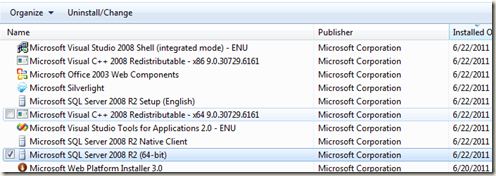
One workaround to solve this problem is to reinstall de SQL Server Management Tools, to do this you must follow this procedure:


- In Control Panel – Programms – Select the SQL Server Instance and then the Uninstall/Change option.
 

image


- This will open the SQL Server installation and then you choose to remove the Management Tools

- Restart the machine

- Go again to the Control Panel to modify the installed SQL Server instance and then rerun the setup using the Uninstall/Change option

- Select the Management Tools to reinstall them

- Once again you have a fully functional Management Studio


Best Regards,


Dr. Eduardo Castro Martinez

Microsoft SQL Server MVP

http://tiny.cc/comwindows

lunes, 11 de julio de 2011

Paso a paso de instalación de SQL Server PowerPivot

En el siguiente screencast mostramos paso a paso la instalación de una instancia de SQL Server 2008 R2 para que soporte PowerPivot y su integración con SharePoint. http://www.youtube.com/watch?v=91qYDyh2xT0

Saludos,

Ing. Eduardo Castro Martínez

Microsoft SQL Server MVP